Purchase
Individual Annual
Get full access to DataGraph for an entire year
Individual Perpetual
Pay just once for unlimited access
Perpetual
US$119.99 one time
Also available on the Mac App Store.
Group Licenses

DataGraph licenses can be used for organizations or research groups, where users may change overtime. Any license you purchase, can be moved into a group.
Volume Discounts
Annual
| Quantity | Commercial Price/License |
|---|---|
| 1-4 | $49.99 |
| 5-9 | $44.99 |
| 10-19 | $39.99 |
| 20-39 | $37.49 |
| 40-49 | $34.99 |
| 50-99 | $32.99 |
| 100+ | $31.49 |
| Quantity | Academic Price/License |
|---|---|
| 1-4 | $29.99 |
| 5-9 | $26.99 |
| 10-19 | $24.99 |
| 20-29 | $22.49 |
| 30-49 | $20.99 |
| 50-99 | $19.49 |
| 100+ | $18.49 |
Perpetual
Purchase 5 licenses, and the 5th one is free
Purchase 5+ licenses, and get 20% off the total cost!
*discounts automatically applied at checkout, prices in USD
Frequently Asked Questions
How do I register DataGraph?
Licenses purchased from our on-line store will be tied to an email address. Annual licenses are for one user, one machine. Perpetual license holders can register up to three machines for themselves and immediate family members only.
InstructionsHow do I renew my annual license?
To renew your annual license, simply purchase an additional year using the same email you used to register DataGraph. Next time you open DataGraph, your license will be extended one year. If your license has not expired, one year will be added to the end of your current license.
How do I register DataGraph purchased from the macApp store?
If you purchased through the Mac App store, register your license to use the Beta version of DataGraph. Go to DataGraph > Account Information in the version of DataGraph downloaded from the macApp store.
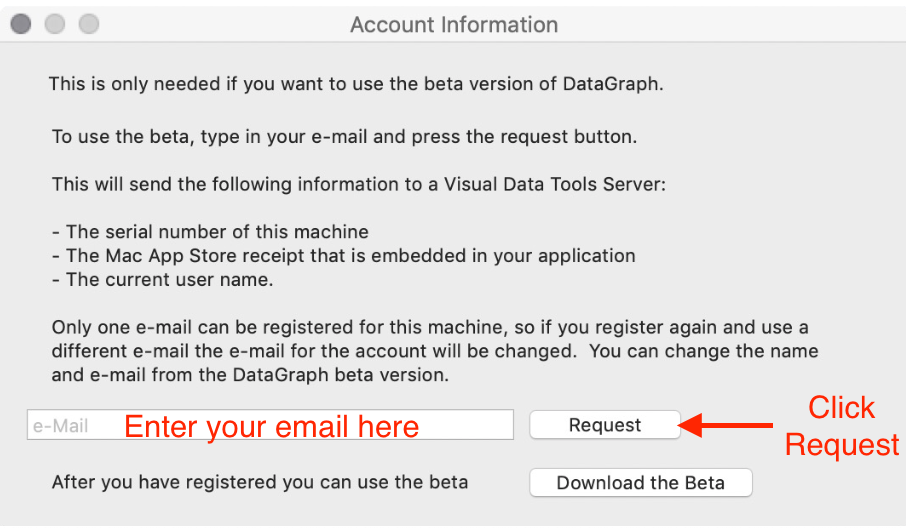
Enter your email and click request. A notification should pop-up indicating the registration was successful. Now you will be able to download and open the beta version on that computer.